How to use the Order Tracker
Updated at 2026-07-26
The Order Tracker lets you view Shopify order details without leaving the conversation. It is available for any project that is connected to a Shopify store.
Requirements
- Your project must be connected to Shopify.
- The conversation must be linked to a customer with a Shopify order.
Open a conversation
From the conversation dashboard, open a conversation in a Shopify-connected project. If the customer's email matches a Shopify customer, the Shopify orders button appears in the conversation header.
View order details
Click the Shopify orders button to open the order details drawer.
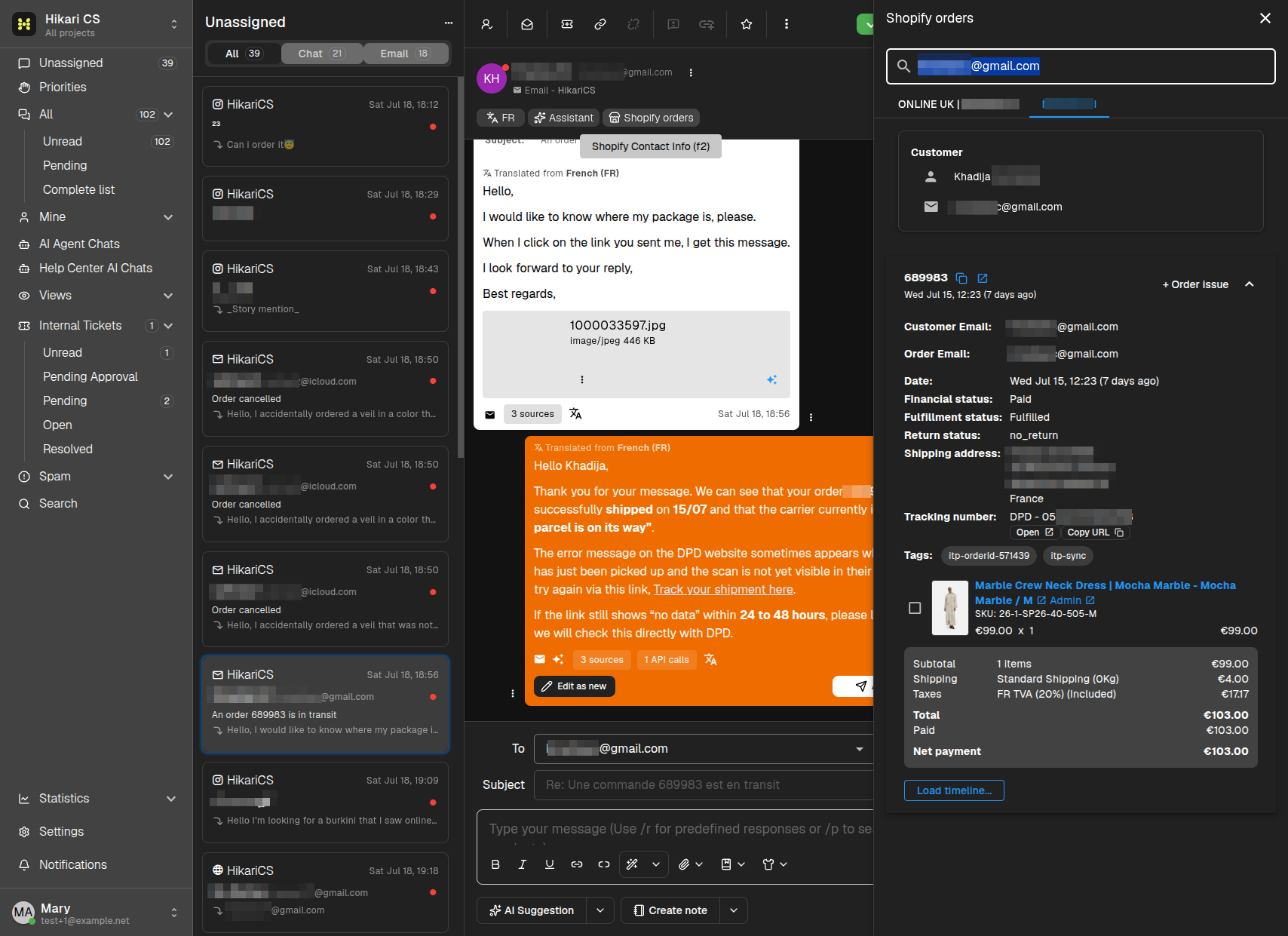
The drawer shows:
- Customer name and email.
- Order number, date, and financial/fulfillment status.
- Shipping address and tracking number.
- Line items, prices, taxes, and totals.
You can also open the carrier tracking page or copy the tracking URL.
Summary
- The Order Tracker requires a Shopify-connected project.
- Open a conversation and click Shopify orders.
- Review order status, shipping, and line items in the drawer.