Set up a custom domain for the Help Center
Updated at 2025-03-27
Your Help Center can be customized with its own domain, and it's really easy to set this up. If you decide not to create a custom domain, your help center will still be available under a default URL, like: your-company.hcs-helpcenter.com.
Wouldn't it be great to have a domain like helpcenter.yourdomain.com? Let's go through the simple steps to set this up.
- Head over to your DNS provider and look for the option to edit your domain's DNS settings.
- Add a new row to your domain’s DNS rules (in case an empty row is not already there)
- Enter the following details:
- Host or Hostname:
helpcenter.yourdomain.comor any other name or subdomain you wish to use. Please check your provider's support documentation for the exact syntax required. - Type: Select
CNAMEas the type. - Value:
helpcenter.hcs-helpcenter.com
Ensure that the value in step 1 matches what you have in your Help Center’s settings (under custom domain):
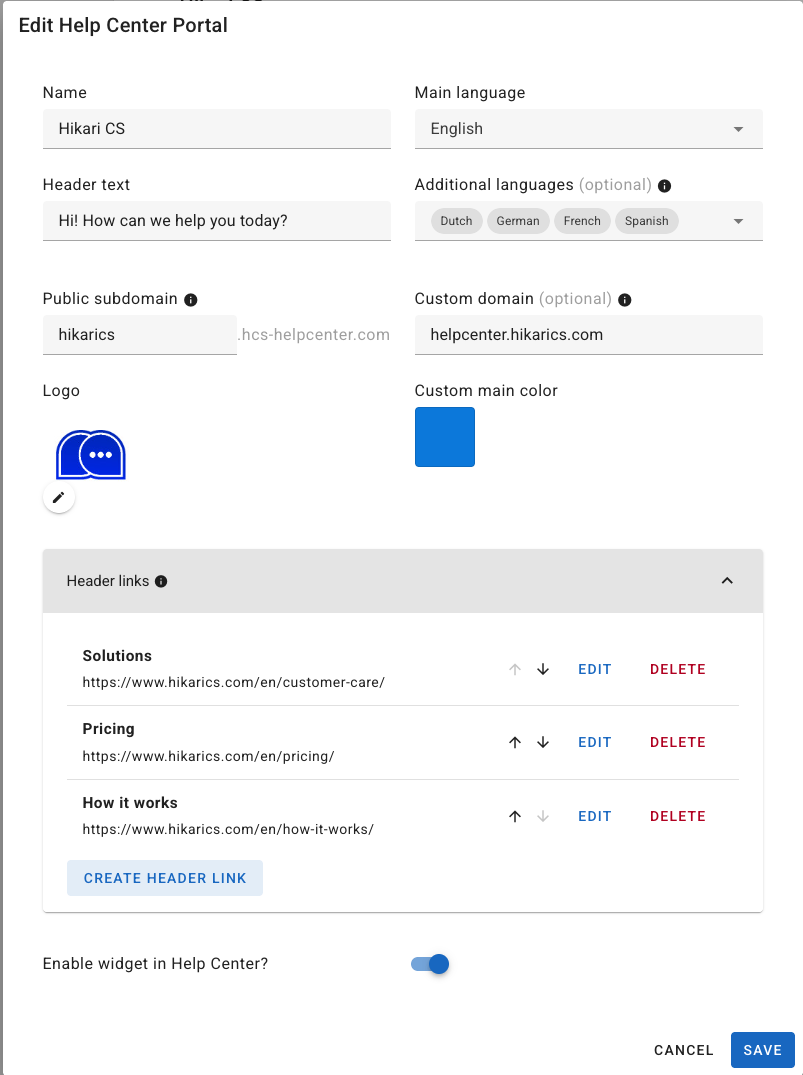
That's all there is to it! Keep in mind that DNS settings can take up to 24 hours to update. Once they do, visiting your custom domain should direct you to your Help Center.
Read this article to learn how to add your help center to your website’s menu.