Install the Live Chat widget
Updated at 2025-03-19
Installing the chat widget on your website is very easy.
Shopify
For Shopify we have a dedicated app you can easily install with a few clicks. Follow the next steps to install the Hikari CS app in your Shopify store:
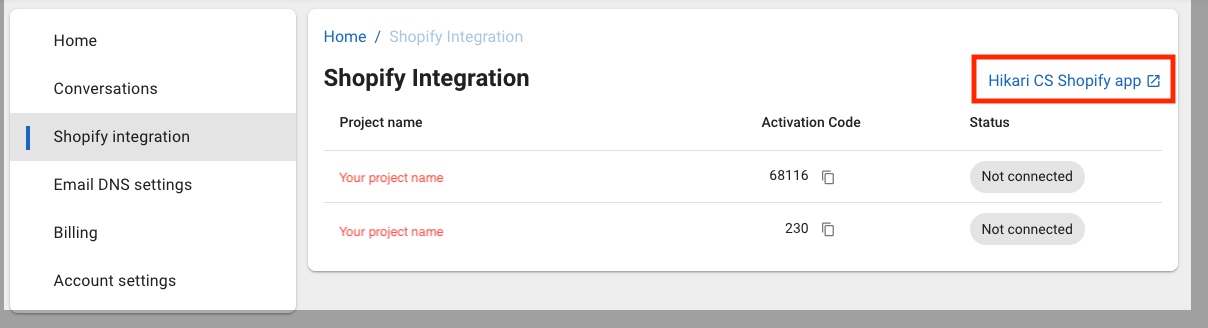
Steps:
-
Login to your Hikari CS customer portal
-
Go the Shopify Integration menu and click the link "Hikari CS Shopify app" to go to the Shopify app store.
-
Approve the permissions needed in the Shopify app's page. You will now be redirected to the success page.
-
Activate the app:
- Now you can either click the activation link on the succes page (recommended)
- Or get the activation code from your Hikari CS portal (under the Shopify integration menu) and paste it in the success page.
- If you paste the code manually, you need to go back to the app in your Shopify store and activate the app manually.
-
And you're done!
Note: you won't see the chat widget immediately after activating as we have it hidden by default until the onboarding is completed.
Other online store platforms
To show the chat widget on your website you'll need to paste a piece of code which needs to be loaded on every page.
Normally most website CMS systems have a dedicated section where you can add codes to your site. If you can't find it, it's best to contact your website administrator or builder to request assistance. Pasting the actual code (if you know where to do this) is just a matter of a few minutes of work!
The code you received from Hikari CS must be pasted just before the </head> tag of your website.
The code looks similar to the below example:
<script src="https://widget.hikarics.com/web?token=XXXXXXXXXXXXXXXXX" defer="defer"></script>
If you need any help, feel free to reach out to us and we will be happy to help!